Google Sheets add-on · Private beta
See exactly what changed between two Google Sheets tabs.
Pick two tabs in your Google Sheets spreadsheet and a key column. SheetCompare writes a clear report of every row that was added, removed or changed, right inside the same spreadsheet.
Your original tabs are never changed · Tested with up to 100,000 rows per tab
SheetCompare Report
Key: SKU
12
Added
3
Removed
28
Changed
1,204
Unchanged
| Status | Key | What changed | Old value | New value |
|---|---|---|---|---|
| added | SKU-1042 | New row | — | Desk lamp · 24.90 |
| removed | SKU-0877 | Row is gone | Mouse pad · 6.50 | — |
| changed | SKU-0311 | Price | 18.00 | 19.50 |
| changed | SKU-0554 | Stock | 40 | 12 |
The problem
Spotting changes in Google Sheets by eye doesn't scale
Price lists, inventory, customer lists, exports. If you keep two versions of the same data, you eventually have to ask what changed.
Two versions, thousands of rows
A new export lands next to last month's. Finding what moved by scrolling is slow and easy to get wrong.
Rows don't stay in the same order
Sorted differently, a few inserted, a few deleted. Comparing line by line stops working.
Formulas get fiddly fast
Lookup formulas and helper columns can answer the question, but you have to build and check them every time.
Features
Everything you need to compare two tabs, nothing you don't
A focused add-on for Google Sheets that does one job and shows its work.
Compares by key, not by position
Choose an ID column such as SKU or email. Rows are matched by that key, so sorting or inserting rows doesn't break the comparison.
Every row gets a status
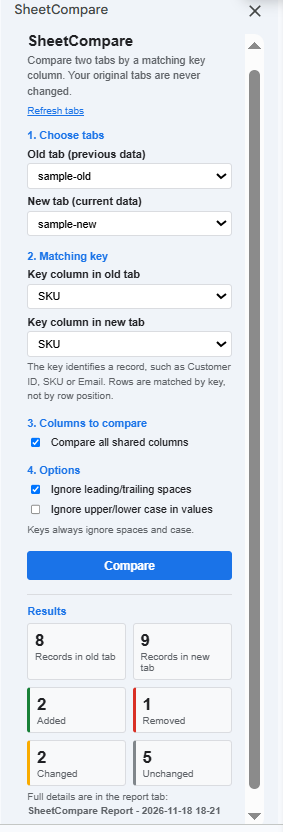
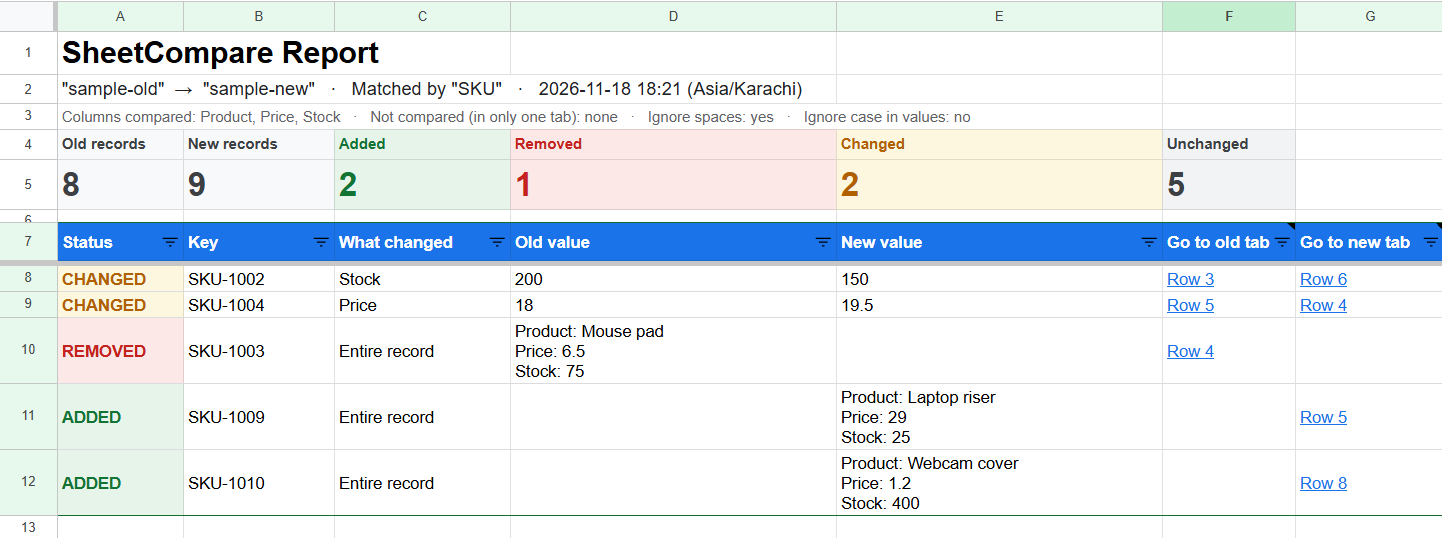
Added, removed, changed or unchanged. You see the overall counts first, then the details.
Shows what changed in each row
For changed rows, the report lists the columns that differ with the old and new values side by side.
Jump straight to the row
Each report row has links to the matching row in the old tab and the new tab.
Stops on messy keys
If a key is blank or duplicated, SheetCompare stops and tells you which rows to fix instead of giving a misleading result.
Your original tabs stay untouched
Each run writes a new report tab. The add-on only works with the spreadsheet you open it in.
Matching is forgiving where it should be: you can ignore extra spaces and capitalization, and a number typed as text (like "1001") still matches the number 1001.
In your spreadsheet
See it in action
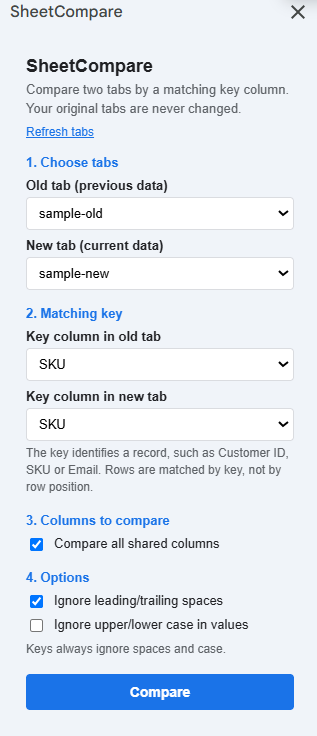
Real screenshots of SheetCompare running in Google Sheets, using the sample data from this site.
How it works
From two tabs to a clear report in three steps
01
Pick two tabs
Open SheetCompare from the Extensions menu in your Google Sheets spreadsheet and choose the old tab and the new tab.
02
Choose the key column
Select the column that identifies each row, like an ID or email. Turn on the optional settings to ignore spaces or capitalization.
03
Read the report
A new report tab opens with the summary, the status of every difference, and links back to the rows.
FAQ
Questions people ask first
Does SheetCompare work with Excel?
No. SheetCompare is an add-on for Google Sheets only. It does not read or compare Excel files.
Does it change my original tabs?
No. Each run writes a new report tab. Your two source tabs are only read, never edited.
What does it need access to?
Only the Google Sheets spreadsheet you open it in, plus permission to show its sidebar. It does not ask for access to your other files in Google Drive.
Can I compare two different spreadsheet files?
Not yet. Right now it compares two tabs inside the same spreadsheet. To compare two files, copy one of the tabs into the other file first.
What happens if my key column has blanks or duplicates?
SheetCompare stops and tells you which row numbers to fix, instead of producing a misleading report.
How big can the tabs be?
It has been tested with up to 100,000 rows and 600,000 cells per tab. The report lists up to 30,000 differences and tells you when more exist. Very large sheets can take a minute or more.
How much does it cost?
Pricing hasn't been announced yet. We'll publish it on the Pricing page before any paid plan starts.
Private beta
Try SheetCompare in your own Google Sheets
We're inviting a small group of people who compare spreadsheet versions regularly. Tell us how you use Google Sheets and we'll send you access.
The signup form is being set up. Check back soon.
While the add-on is in beta, Google may show an "unverified app" notice the first time you authorize it. We'll explain exactly what each permission does before you install.